






Transitioning to a New Build Numbering System
We are excited to announce that ParagonNet is now officially transitioning to the new build numbering system! 🎉
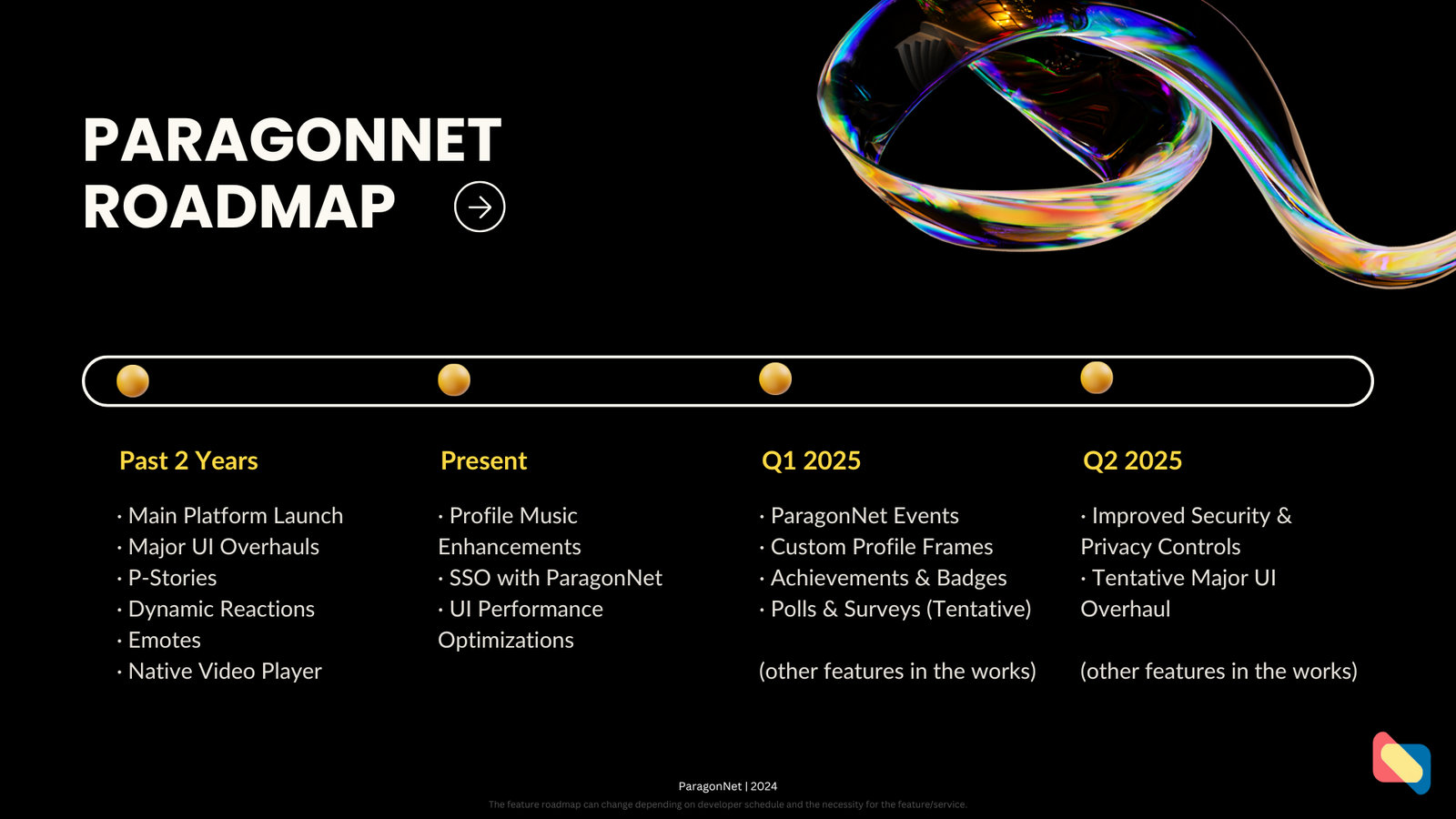
With this transition, we have successfully delivered most of the features promised for Q4 2024, including:
· Profile Music Enhancements: Expanded support for streaming services and customization options.
· Sign-In/Sign-Up with ParagonNet: Seamless SSO integration across all modules.
· UI Performance Optimizations: Faster page loading and a smoother experience.
However, the Polls & Surveys feature is still in development and will be released in an upcoming update. We appreciate your patience as we finalize this functionality.
What’s Next?
We are currently at Version 2.0.0, marking the completion of the major Q4 2024 update. Moving forward, all updates will follow the A.B.C versioning format, with the addition of optional suffixes for special circumstances:
· A (Major Update): Significant new features or platform-wide changes.
· B (Major Change): Enhancements or updates to existing features.
· C (Minor Change): Bug fixes and optimizations.
· Suffix Letters: Indicate special updates, such as:
· E (Emergency Update): Critical fixes requiring immediate release.
· B (Beta Release): Updates in a testing phase.
· X (Experimental Build): Features or optimizations being trialed.
· H (Hotfix): Quick fixes addressing urgent issues without waiting for a scheduled release.
For example, Version 2.0.1E would signify a minor update with an emergency fix, while 2.1.0X would denote a major feature in experimental rollout.
Looking Ahead
We remain committed to delivering on our roadmap and providing a seamless experience for our users. The next major milestone, Version 3.0.0, is scheduled for Q1 2025, bringing exciting features like ParagonNet Events and Achievements & Badges.
Thank you for your continued support and feedback as we refine and enhance ParagonNet. Stay tuned for updates, and let us know how we can make the platform even better!
— The ParagonNet Team
#v2.0.0 #GlassFlowUI3.1 #ParagonNetEnhancements
7:30 PM · Dec 18, 2024 ·
7:30 PM · Dec 18, 2024 ·
Terms of Service
Last TweetPoll Update: August 14, 2026 / 10:42:05am

Spoilers At the start of your spoiler, add a "/s" followed by your spoiler/s, and end with "!s" to close the spoilers.
Credits Text (Sub-text) At the start of your credits, add a "/creds" followed by your credit/s, and end with "!creds" to close the credits.
Center Text At the start of your text, add a "/center" followed by your text/s, and end with "!center" to close the center text tag.
Bold Text At the start of your text, add a "/b" followed by your text/s, and end with "!b" to close the bold text tag.
Italicize Text At the start of your text, add a "/i" followed by your text/s, and end with "!i" to close the italize text tag.
Horizontal Rule To add a horizontal rule on your post, simply add "/hr" to where you want to put a horizontal rule.
Colored Text There are three (3) different kinds of tags for coloring your text. you may use "/color(*)", "/hex(**)", or "/rgb(***,***,***)" and end with "!color", "!hex", or "!rgb" respectively.
Color examples:
* - (red), (green), (blue), (yellow)
** - (00acee), (ffffff), (123456), (ff0000)
*** - (0,0,0), (120, 140, 160), (255, 255, 255)